The address bar
One line for addresses, searches, open tabs, Kestrel's own pages, token addresses and sums. What you type stays yours: nothing leaves the machine unless you turn live suggestions on.
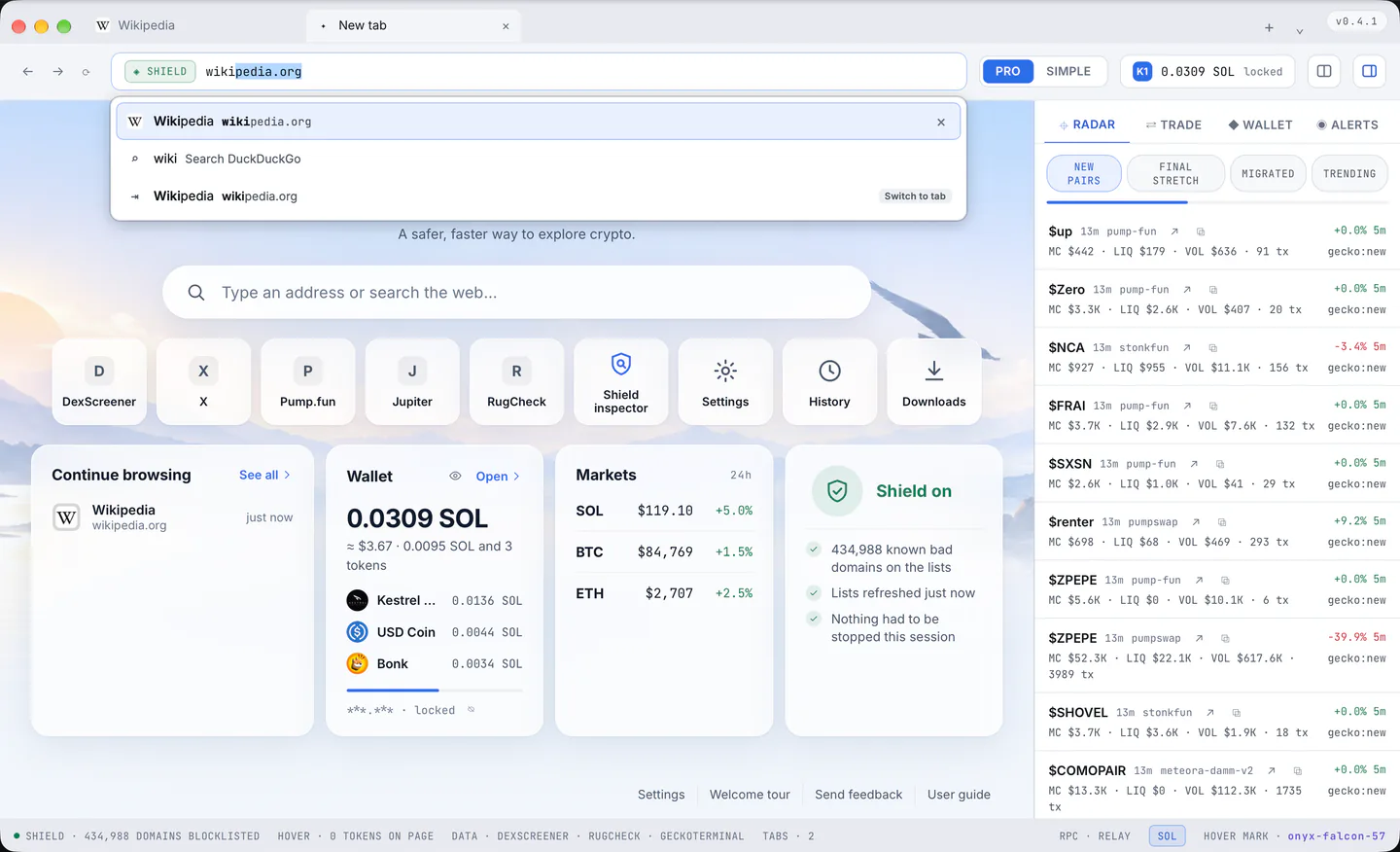
Address or search
An address typed with Enter opens; words search with the chosen engine. The decision uses IANA's list of real top level domains, so bonk.fun is a site and node.js a search. localhost:3000, 192.168.1.5 and [::1]:8080 open over http.
A name with credentials in it (phantom.app@evil.com) is always a search, never a site, and javascript:, data: and file: are searches too.
The engine is Settings > General > Search engine: DuckDuckGo (the default), Brave Search, Google, Bing, Startpage, Ecosia, or an address of your own with %s in it.
The list under the bar
- A press in the bar with nothing typed lists the sites visited most.
- Typing ranks history by how often and how recently a page was visited, so a site visited often is offered after a few letters; the matching words are bold.
- The first row is what Enter does. Rows can be a remembered site or page, the address typed, a search, an open tab ("Switch to tab"), a search made before, one of Kestrel's own pages, the Hover card for a token address, or a calculator answer. Eight rows from the machine at most, ten with the engine's own suggestions.
- Cmd+L (Ctrl+L) and a plain new tab select the line and leave the list to the first key or press, so it never covers the new tab page.
The keys and the pointer
- ArrowDown and ArrowUp (and Tab, Shift+Tab) walk the rows and show the chosen one in the line.
- Enter takes it; Option+Enter (Alt+Enter on Windows) opens it in a new tab; Cmd+Enter (Ctrl+Enter) turns
kestrelintowww.kestrel.com. - Escape steps back, first the chosen row, then the list, then the page's address selected, then out of the bar.
- A press on a row takes it; a middle press or Cmd (Ctrl) with a press opens it in a new tab.
- Taking a row out: Shift+Delete on the chosen row, or the "×" that appears on a row. A page or a search leaves the history; a site in the top sites keeps its history and stops being suggested.
Inline completion
Typing goo completes the line to google.com with the added part selected, and typing on keeps it. Backspace takes it back, and Enter then means exactly what was typed. Right arrow, End or a press in the text accepts it as text. www. or a scheme typed first stays in the line. Nothing completes after a paste, or inside a word an input method is still composing.
Kestrel's own rows
- A token address (Solana or EVM) offers the Hover card under the bar as the first row and a research page under it (Solscan for Solana, DexScreener's search for EVM). The address never goes to a web search.
- Shield marks a typed address that is on the blocklists BLOCKED, and a canonical brand host VERIFIED, before Enter is pressed.
- The calculator:
250*1.08answers= 270in the list, and Enter on that row or a press on it copies the answer (the status bar says so). It takes+ - * / % ^,x,×,÷, parentheses and a leading=.
Search modes
@ lists every mode: @tabs searches the open tabs, @history the history, @google, @bing, @brave, @ddg, @startpage and @ecosia search that engine once, @dex DexScreener, @x X. Enter a mode by typing @goo and pressing Tab, or @google with the space; a chip appears in the bar, and Backspace on an empty line leaves it.
The line itself
- What is typed stays. Each tab keeps its own line: a press on the page or anywhere in the chrome, a tab switch, or a page moving on by itself never take it away. Enter, a pick or Escape do.
- When the bar is not in use the address reads quietly: no
https://, nowww., the site in full ink and the rest dimmed. Plainhttp://stays visible, in the warning colour. - The Shield badge sits to the left of the line, and on a page whose own token Hover found, a chip with its score; a press on the chip opens the card.
Live suggestions from the engine, off until turned on
Settings > General > "Search suggestions while typing". While it is off, nothing about what is typed leaves the machine. While it is on, the chosen engine is asked as you type, and the core still holds back anything shaped like an address, a key, a long hex or base58 run, a long number, an e-mail address or recovery phrase words, and anything under two or over a hundred characters. A custom engine gets no suggestions.