Shield: what is stopped and what is checked
Shield is always on and is never part of a tier. It works in three places: before a page loads, around the addresses a page shows, and before anything is signed.
Before a page loads
Every address a content webview asks for, the frames inside it included, is judged first: a host you allowed before, then the brand hosts Kestrel ships (VERIFIED), then the blocklists, then a punycode host, then the look-alike checks. What happens next depends on who asked.
You typed it, or you pressed a link (and whatever redirects follow within five seconds of the press): the tab shows the full page, "Shield blocked this page", the host, the reason, and the line that nothing from the site reached the browser. Two buttons: "Go back, stay safe", and "I understand the risk", which turns into "Open anyway (unsafe)". Two presses are needed, and the host is then remembered so you are not asked again. Kestrel knows it was your press because it hears the press from the machine itself, not from the page, so a page cannot claim one.
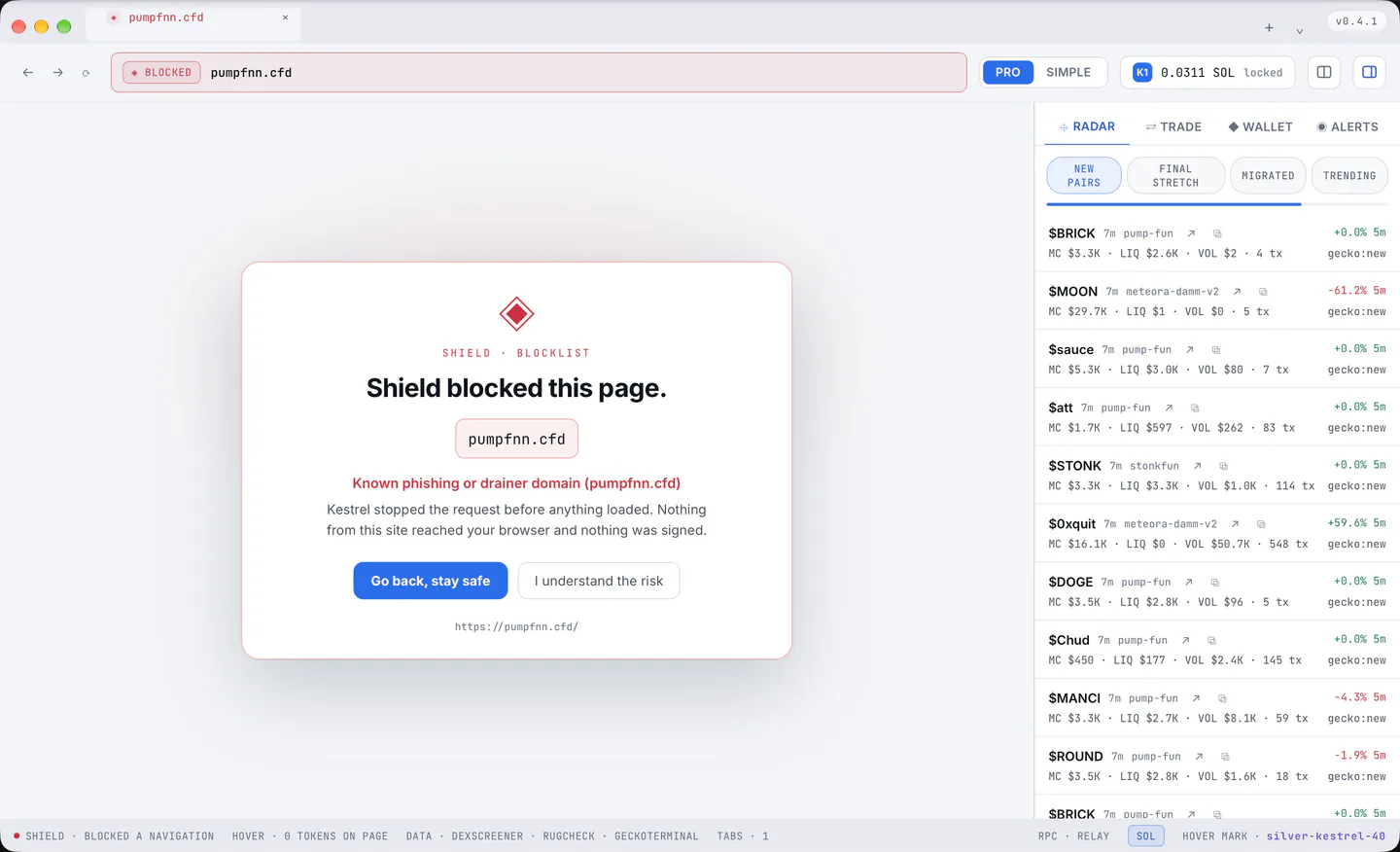
The page asked by itself (an iframe, a redirect, a script, with no press of yours behind it): it is refused where it stands, the page does not change, and no override is offered. The Shield badge in the address bar then counts it, "◈ SHIELD · 1", in red; a press on the badge lists what was stopped on this page and offers the Alerts pane, and the count clears when the tab loads a new document.
Only the blocklists refuse a page's own request: a frame or a script a sound site loads on a brand-named helper host (a CDN, a sign-in domain, a partner) is the site's own choice, so the look-alike warnings never refuse it (they judge what you type). A page that tries to replace the tab with a data: document is bounced back.
The badge in the address bar
"◈ SHIELD" normally, "◈ VERIFIED" on one of the canonical brand hosts Kestrel ships, "◈ BLOCKED" on a blocked one. The brand hosts: Phantom, Solflare, Jupiter, Raydium, pump.fun, DexScreener, Magic Eden, Tensor, Orca, Meteora, Birdeye, RugCheck, Solscan, MetaMask, Uniswap, OpenSea, Coinbase, Binance, Ledger, Hyperliquid, Axiom, kestrelbrowser.com and their subdomains. No third-party list can ever hand out VERIFIED, and a host you allowed past a warning never shows it.
The lists
Scam Sniffer, MetaMask's phishing list and Phantom's blocklist, about 430,000 domains, cached in the profile and refreshed when they are more than six hours old (the status bar counts them). A small list is compiled in, so a first run with no network still blocks.
Two lists of Kestrel's own outrank them: the brand hosts, and the world's 10,000 most visited sites, which no community list may block wholesale (Scam Sniffer named www.bing.com for the redirect links phishing kits pass through it, and Bing was blocked until 2026-09-18). A page on a subdomain of such a site can still be blocked, and a drainer a redirector leads to is judged when the redirect reaches it.
Warnings, not blocks
A punycode host, a name one letter from a brand, a brand's name inside another domain, or a name close to one on MetaMask's fuzzy list: these are flagged rather than blocked, and Settings > Shield can turn them off. The world's well-known sites are never judged this way (tensorflow.org carries "tensor", jupyter.org is a letter from "jupiter").
http:// addresses are opened as https:// where the host answers (Settings > Shield), and a local or numeric address is left alone.
Before a signature
Every transaction, whether it comes from the Trade pane, a Hover card or a send, is decoded (legacy and v0), read against the drainer rules and simulated on mainnet with the exact bytes that would be signed. What it found is shown before the button: what the transaction does line by line, the programs it touches, the flags with their level, whether the simulation passed and how much SOL and which tokens would move.
Kestrel refuses outright, with no override, when it finds:
- a critical flag (ownership of your wallet account or of a token account being handed away);
- a failed simulation;
- bytes that were never quoted;
- more SOL leaving than the quote said, or any other token leaving;
- less coming back than promised.
A high flag needs an explicit tick. And a window of the operating system's own, which no page and no part of Kestrel's interface can press, asks the final question for every send, every risky or overridden swap, every swap of 2 SOL or more, and any burst of more than three signatures in a minute.
The inspector
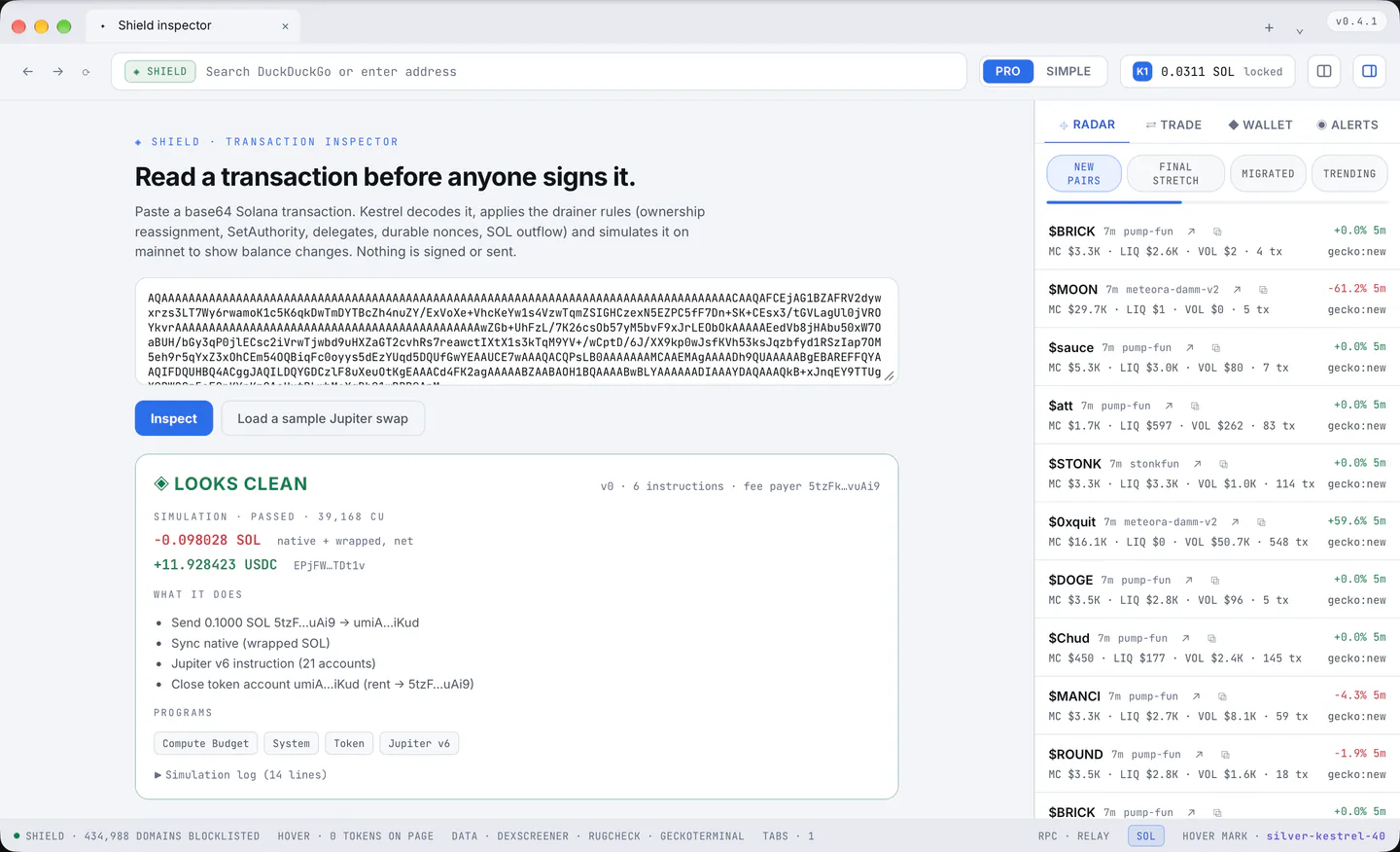
kestrel://shield reads any transaction you paste (base64) and shows the same report, signing nothing: "Read a transaction before anyone signs it". A sample Jupiter swap is one button away. Reach it from the new tab page's quick links or by typing "shield inspector" in the address bar.
Sites you allowed
Settings > Shield lists every host you opened past a warning, with an "×" to take one back and "Forget all" for the lot.